# Trading Buddy
## Introduction to Trading with Fwen Bot
Our trading interface is specifically designed to make trading intuitive and simple. It not only facilitates quick and efficient transactions but also helps you capitalize on market movements as they occur.
### Step 1: Connect your wallet
[IMAGE 1: Start Interface]
Begin your crypto trading journey by connecting your wallet to Fwen Bot. Simply type `/start` in your chat with Fwen Bot to set up or link your wallet. Think of Fwen Bot as your dependable friend who keeps your funds secure and ready for action.
### Step 2: Funding your wallet
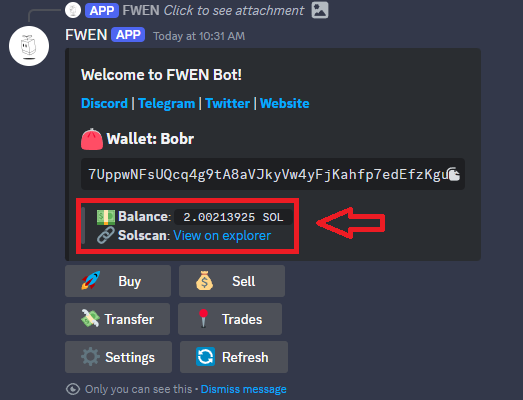
[IMAGE 2: Wallet Balance]
Ensure your wallet is funded with sufficient **SOL** to cover your intended purchases and any associated transaction fees. Since Fwen Bot interacts directly with your wallet, having it prepared is crucial for seamless trading.
### Step 3: Initiate a Buy Command
[IMAGE 3: Buy Command]
To initiate a purchase, either click the **Buy** button in the Fwen Bot interface or type `/buy` followed by the token's contract address you wish to purchase.
### Step 4: Selecting the Right Project
[IMAGE 4: Token Details]
You will be presented with important token details to help you make an informed decision, such as price, market cap, and other relevant information. Please review these details carefully to ensure they match the token you intend to buy, verifying the contract address to avoid any discrepancies.
### Step 5: Custom Buy Amounts
[IMAGE 5: Buy Settings]
For a quick purchase, you can select from our preset amounts (e.g., 0.1 SOL, 0.5 SOL, 1 SOL). If you wish to buy a different amount, click on **"X SOL"** to enter the exact amount of SOL you'd like to spend. You can also customize your preset amounts in the settings at any time for future convenience.
### Step 6: Executing and Keeping Track of Your Transaction
[IMAGE 6: Confirming the buy order, and keeping track of your transaction]
After confirming the details and proceeding with the purchase, your transaction will be submitted and will await confirmation on the blockchain. Once confirmed, a window will display the amount of SOL spent and the amount of tokens received. A **Solscan** transaction link will also be provided, allowing you to verify the transaction details on the blockchain explorer.
### Step 7: Tracking your performance
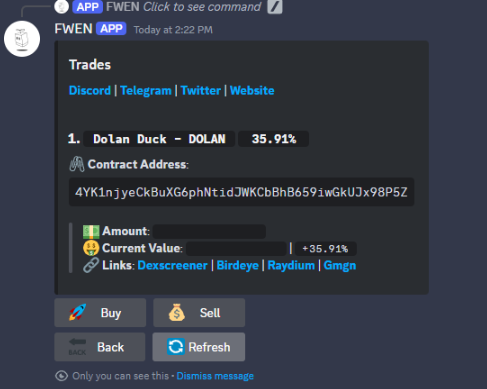
[IMAGE 7: Trades Feature]
Under the **Trades** function, you can monitor the performance of your tokens at any time. This feature provides real-time updates on your holdings, including current value, profit/loss, and other relevant metrics to help you make informed decisions.
***
{% hint style="info" %}
**HINT:** Didn't find what you're looking for? Join our [Discord channel](https://docs.fwen.bot/introduction/important-links) for support and to connect with our community!
{% endhint %}